Mini-Map
Embed a floor plan preview in your content screens and expand it into a full interactive map on tap.
Overview
A mini-map is a floor plan preview embedded directly in your app — right where attendees are already looking. Tap an exhibitor and see exactly where their booth is. Tap again to expand into a full interactive map with wayfinding directions.
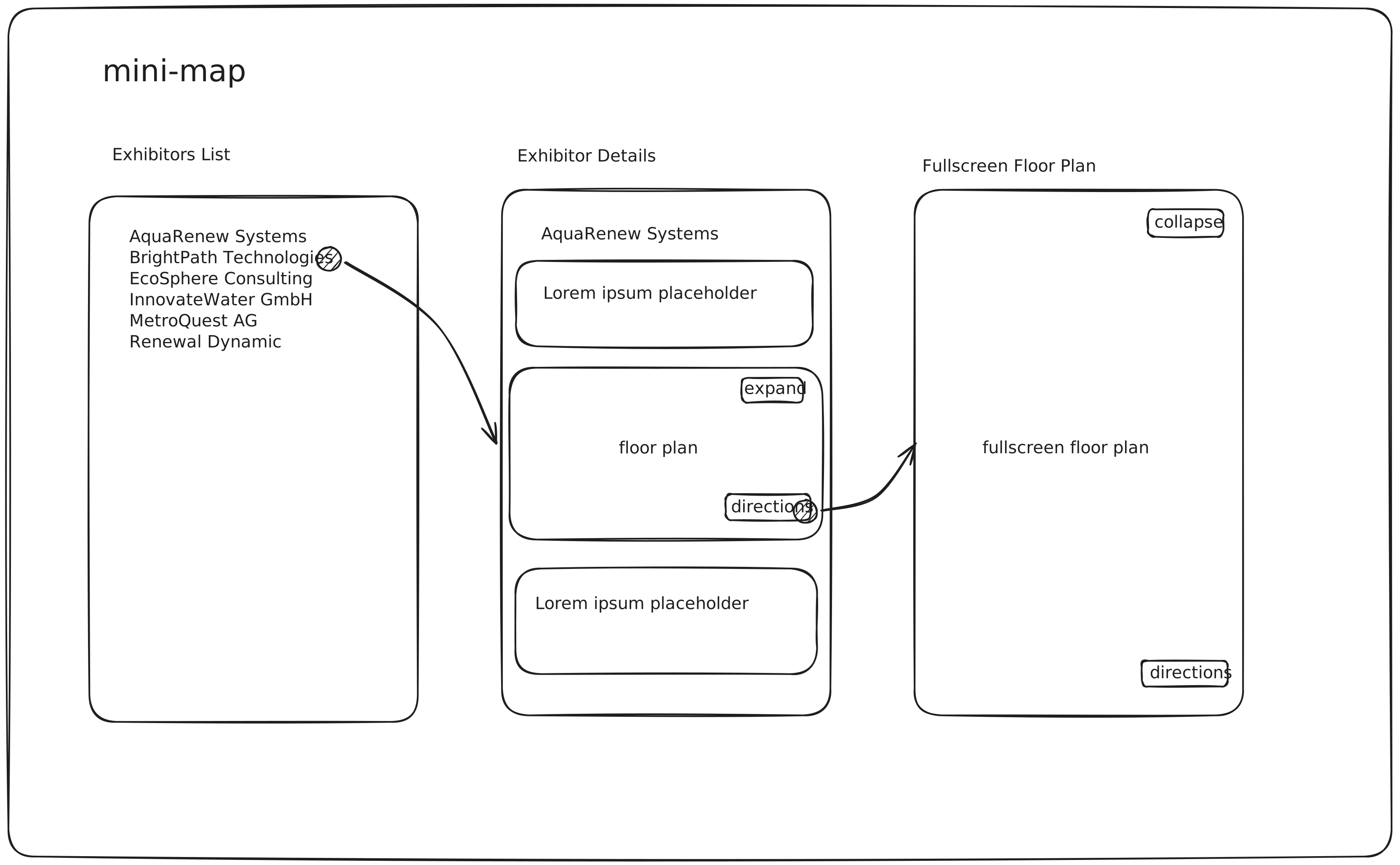
The example follows a three-screen flow:
- Exhibitors List — loads exhibitors from the SDK and renders them as a scrollable list.
- Exhibitor Detail — shows an inline floor plan preview with the selected booth highlighted, plus Expand and Directions buttons.
- Fullscreen Plan — the mini-map expands into a full interactive plan with Collapse and Directions controls.
Quick Start
The full source is in the Android examples repository:
git clone https://github.com/expofp/expofp-sdk-android-examples.git
cd expofp-sdk-android-examples
Open in Android Studio, select the mini-map run configuration, and run on a device or emulator.
Prerequisites: Android Studio Ladybug or later, Min SDK 26, Target/Compile SDK 36.
Architecture
The app follows MVVM + Single Activity with Jetpack Compose, Hilt for dependency injection, and Navigation Compose for routing.
- Single presenter with preloading — a single
PlanManagerpreloads the plan once and shares one presenter across screens. The SDK'sgetView()returns a self-sizing host container, and the plan content follows the most recently attached host, so reparenting across screens works without manual wrapping. - Hilt DI —
PlanManageris a@Singletoninjected into ViewModels. The presenter lifecycle is tied toMainActivity(preload inonCreate, dispose inonDestroy). - Plan preloading — the plan starts downloading in
MainActivity.onCreate()before any UI renders, so it's ready by the time the user navigates to a detail screen. - AnimatedVisibility — Compose animates the content above and below the map to collapse/expand. The map stays in the same composable tree position at all times (no detach/reattach of the WebView).
Code Walkthrough
MiniMapApplication.kt
Initializes the ExpoFP SDK at application startup. Must happen before any plan operations.
@HiltAndroidApp
class MiniMapApplication : Application() {
    override fun onCreate() {
        super.onCreate()
        ExpoFpPlan.initialize(this)
    }
}
MainActivity.kt
Starts plan preloading early so it downloads while the UI is being set up. Disposes the preloaded plan when the activity finishes.
@AndroidEntryPoint
class MainActivity : ComponentActivity() {

    @Inject
    lateinit var planManager: PlanManager

    override fun onCreate(savedInstanceState: Bundle?) {
        super.onCreate(savedInstanceState)
        enableEdgeToEdge()

        // Start plan preloading early so it downloads while the UI is being set up.
        planManager.preloadPlan()

        setContent {
            MiniMapTheme {
                AppNavigation()
            }
        }
    }

    override fun onDestroy() {
        super.onDestroy()
        // Dispose only when the activity is finishing (not on config changes).
        if (isFinishing) {
            planManager.dispose()
        }
    }
}
Key points:
- Preloading starts in
onCreateso the plan downloads during UI setup. dispose()is only called whenisFinishingis true — not on configuration changes like rotation.
PlanManager.kt
The central bridge between the SDK and the app. Manages the plan lifecycle, presenter access, and data queries.
@Singleton
class PlanManager @Inject constructor() {

    private var planInfo: ExpoFpPreloadedPlanInfo? = null

    private val _presenter = MutableStateFlow<IExpoFpPlanPresenter?>(null)
    val presenter: StateFlow<IExpoFpPlanPresenter?> = _presenter.asStateFlow()

    fun preloadPlan() {
        if (planInfo != null) return

        val params = listOf(
            ExpoFpPlanParameter.NoOverlay(true),
            ExpoFpPlanParameter.HideHeaderLogo(true)
        )
        planInfo = ExpoFpPlan.preloader.preloadPlan(
            planLink = ExpoFpLinkType.ExpoKey(PLAN_KEY),
            additionalParams = params
        )
    }

    fun dispose() {
        planInfo?.let { ExpoFpPlan.preloader.disposePreloadedPlan(it) }
        _presenter.value = null
        planInfo = null
    }

    fun obtainPresenter() {
        val info = planInfo ?: return
        _presenter.value = ExpoFpPlan.preloader.getPreloadedPlanPresenter(info)
    }

    fun getPlanStatusFlow(): StateFlow<ExpoFpPlanStatus>? = planInfo?.planStatusFlow

    suspend fun getExhibitors(): ExpoFpResult<List<ExpoFpExhibitor>> {
        val presenter = _presenter.value
            ?: return ExpoFpResult.failure(ExpoFpError.InternalError(message = "No presenter"))
        return presenter.exhibitorsList()
    }

    suspend fun getBooths(): ExpoFpResult<List<ExpoFpBooth>> {
        val presenter = _presenter.value
            ?: return ExpoFpResult.failure(ExpoFpError.InternalError(message = "No presenter"))
        return presenter.boothsList()
    }

    companion object {
        private const val PLAN_KEY = "demo"
        const val ENTRANCE_BOOTH = "Entrance"

        val HIDDEN_ELEMENTS = ExpoFpElementsVisibility(
            controls = false, levels = false, header = false, overlay = false
        )
    }
}
Key points:
- The preloader API is a three-step lifecycle:
preloadPlan()→ observeplanStatusFlow→getPreloadedPlanPresenter()after Ready. disposePreloadedPlan()must be called explicitly — the SDK does not auto-cleanup.ExpoFpPlanParameter.NoOverlayandHideHeaderLogoare passed at preload time instead of callingsetElementsVisibilitylater.
PlanMapView.kt
Bridges the SDK's native Android View into Compose via AndroidView. getView() returns a MATCH_PARENT host container and the plan content moves to it once it is attached, so reparenting between screens needs no manual wrapping.
@Composable
fun PlanMapView(
    presenter: IExpoFpPlanPresenter,
    modifier: Modifier = Modifier
) {
    AndroidView(
        factory = { presenter.getView() },
        modifier = modifier
    )
}
ExhibitorListViewModel.kt
Observes the plan preloading lifecycle and fetches the exhibitor list once the plan is ready.
@HiltViewModel
class ExhibitorListViewModel @Inject constructor(
    private val planManager: PlanManager
) : ViewModel() {

    private val _uiState = MutableStateFlow(ExhibitorListUiState())
    val uiState: StateFlow<ExhibitorListUiState> = _uiState.asStateFlow()

    init {
        observePlanStatus()
    }

    private fun observePlanStatus() {
        viewModelScope.launch {
            val statusFlow = planManager.getPlanStatusFlow() ?: run {
                _uiState.update { it.copy(isLoading = false, error = "Plan not preloaded") }
                return@launch
            }

            statusFlow.collect { status ->
                when (status) {
                    is ExpoFpPlanStatus.Loading -> {
                        _uiState.update {
                            it.copy(isLoading = true, loadingProgress = status.percentage)
                        }
                    }
                    is ExpoFpPlanStatus.Initialization -> {
                        _uiState.update { it.copy(isLoading = true) }
                    }
                    is ExpoFpPlanStatus.Ready -> {
                        planManager.obtainPresenter()
                        loadExhibitors()
                    }
                    is ExpoFpPlanStatus.Error -> {
                        val message = when (val err = status.error) {
                            is ExpoFpError.InternalError -> err.message ?: "Internal error"
                            is ExpoFpError.DownloadingPlanError -> "Failed to download plan"
                            is ExpoFpError.InvalidExpoKey -> "Invalid expo key"
                            else -> "Failed to load plan"
                        }
                        _uiState.update { it.copy(isLoading = false, error = message) }
                    }
                }
            }
        }
    }

    private fun loadExhibitors() {
        viewModelScope.launch {
            when (val result = planManager.getExhibitors()) {
                is ExpoFpResult.Success -> {
                    _uiState.update {
                        it.copy(isLoading = false, exhibitors = result.value, error = null)
                    }
                }
                is ExpoFpResult.Failure -> {
                    _uiState.update {
                        it.copy(isLoading = false, error = "Failed to load exhibitors")
                    }
                }
            }
        }
    }
}
ExhibitorDetailViewModel.kt
Manages booth highlighting, map expand/collapse state, and directions routing.
@HiltViewModel
class ExhibitorDetailViewModel @Inject constructor(
    private val planManager: PlanManager,
    savedStateHandle: SavedStateHandle
) : ViewModel() {

    private val exhibitorName: String = savedStateHandle.toRoute<ExhibitorDetail>().exhibitorName

    private val _uiState = MutableStateFlow(ExhibitorDetailUiState(exhibitorName = exhibitorName))
    val uiState: StateFlow<ExhibitorDetailUiState> = _uiState.asStateFlow()

    val presenter: StateFlow<IExpoFpPlanPresenter?> = planManager.presenter

    init {
        resolveBoothName()
    }

    private fun resolveBoothName() {
        viewModelScope.launch {
            val exhibitors = planManager.getExhibitors().getOrNull() ?: return@launch
            val exhibitor = exhibitors.find { it.name == exhibitorName } ?: return@launch
            val firstBoothId = exhibitor.booths.firstOrNull() ?: return@launch

            val booths = planManager.getBooths().getOrNull() ?: return@launch
            val booth = booths.find { it.id == firstBoothId } ?: return@launch

            val name = booth.externalId.ifEmpty { booth.name }
            _uiState.update { it.copy(boothName = name) }
            planManager.presenter.value?.selectBooth(name)
        }
    }

    fun onScreenEnter() {
        val presenter = planManager.presenter.value ?: return
        presenter.setElementsVisibility(PlanManager.HIDDEN_ELEMENTS)
        presenter.fitBounds()
    }

    fun onScreenExit() {
        val presenter = planManager.presenter.value ?: return
        presenter.selectBooth("")
        presenter.selectRoute(emptyList())
        presenter.fitBounds()
    }

    fun toggleMapExpanded() {
        val currentState = _uiState.value
        val presenter = planManager.presenter.value ?: return

        if (currentState.isMapExpanded) {
            if (currentState.isDirectionsActive) {
                presenter.selectRoute(emptyList())
            }
            currentState.boothName?.let { presenter.selectBooth(it) }
            presenter.fitBounds()
            _uiState.update { it.copy(isMapExpanded = false, isDirectionsActive = false) }
        } else {
            presenter.setElementsVisibility(PlanManager.HIDDEN_ELEMENTS)
            currentState.boothName?.let { presenter.selectBooth(it) }
            _uiState.update { it.copy(isMapExpanded = true) }
        }
    }

    fun toggleDirections() {
        val boothName = _uiState.value.boothName ?: return
        val presenter = planManager.presenter.value ?: return
        val currentState = _uiState.value

        if (currentState.isDirectionsActive) {
            presenter.selectRoute(emptyList())
            presenter.selectBooth(boothName)
            _uiState.update { it.copy(isDirectionsActive = false) }
        } else {
            presenter.selectRoute(
                from = ExpoFpRouteWaypoint.Booth(PlanManager.ENTRANCE_BOOTH),
                to = ExpoFpRouteWaypoint.Booth(boothName)
            )
            _uiState.update { it.copy(isDirectionsActive = true) }
        }
    }

    fun expandWithDirections() {
        val presenter = planManager.presenter.value ?: return
        presenter.setElementsVisibility(PlanManager.HIDDEN_ELEMENTS)
        _uiState.update { it.copy(isMapExpanded = true, pendingDirections = true) }
    }

    fun consumePendingDirections() {
        if (_uiState.value.pendingDirections) {
            _uiState.update { it.copy(pendingDirections = false) }
            toggleDirections()
        }
    }
}
Key points:
resolveBoothName()chains exhibitor → booth lookup to find the SDK booth identifier for highlighting and routing.expandWithDirections()defersselectRoute()until the expand animation completes via apendingDirectionsflag — calling it on a partially expanded viewport produces incorrect results.toggleDirections()is a toggle — it can both show and clear the route.
ExhibitorDetailScreen.kt
The detail screen with the inline mini-map and fullscreen expansion.
@Composable
fun ExhibitorDetailScreen(
    onNavigateBack: () -> Unit,
    viewModel: ExhibitorDetailViewModel = hiltViewModel()
) {
    val uiState by viewModel.uiState.collectAsStateWithLifecycle()
    val presenter by viewModel.presenter.collectAsStateWithLifecycle()
    val isExpanded = uiState.isMapExpanded

    DisposableEffect(Unit) {
        viewModel.onScreenEnter()
        onDispose { viewModel.onScreenExit() }
    }

    BackHandler(enabled = isExpanded) {
        viewModel.toggleMapExpanded()
    }

    val cornerRadius by animateDpAsState(
        targetValue = if (isExpanded) 0.dp else 16.dp,
        label = "cornerRadius"
    )
    val horizontalPadding by animateDpAsState(
        targetValue = if (isExpanded) 0.dp else 16.dp,
        label = "horizontalPadding"
    )

    Column(
        modifier = Modifier.fillMaxSize().navigationBarsPadding()
    ) {
        // Top bar — hidden when expanded
        AnimatedVisibility(visible = !isExpanded) {
            TopAppBar(
                title = { Text(uiState.exhibitorName) },
                navigationIcon = {
                    IconButton(onClick = onNavigateBack) {
                        Icon(Icons.AutoMirrored.Filled.ArrowBack, contentDescription = null)
                    }
                }
            )
        }

        // Content above map — hidden when expanded
        val contentVisibleState = remember { MutableTransitionState(!isExpanded) }
        contentVisibleState.targetState = !isExpanded

        LaunchedEffect(contentVisibleState.isIdle, contentVisibleState.currentState) {
            if (contentVisibleState.isIdle && !contentVisibleState.currentState) {
                viewModel.consumePendingDirections()
            }
        }

        AnimatedVisibility(visibleState = contentVisibleState) {
            Column(modifier = Modifier.padding(16.dp)) {
                Text(uiState.exhibitorName, style = MaterialTheme.typography.headlineMedium)
                Spacer(modifier = Modifier.height(16.dp))
                Text(LOREM_IPSUM, style = MaterialTheme.typography.bodyLarge)
                Spacer(modifier = Modifier.height(16.dp))
            }
        }

        // Map — stays in place, switches between fixed height and weight(1f)
        Box(
            modifier = (if (isExpanded) Modifier.weight(1f) else Modifier.height(280.dp))
                .fillMaxWidth()
                .padding(horizontal = horizontalPadding)
                .clip(RoundedCornerShape(cornerRadius))
        ) {
            presenter?.let { p ->
                PlanMapView(presenter = p, modifier = Modifier.fillMaxSize())
            }

            // Block touch on mini-map (static preview)
            if (!isExpanded) {
                Box(modifier = Modifier.fillMaxSize().pointerInput(Unit) {
                    awaitPointerEventScope { while (true) { awaitPointerEvent() } }
                })
            }

            // Expand / Directions buttons
            if (presenter != null) {
                Row(
                    modifier = Modifier.align(Alignment.TopEnd).padding(8.dp),
                    horizontalArrangement = Arrangement.spacedBy(4.dp)
                ) {
                    SmallFloatingActionButton(onClick = {
                        if (isExpanded) viewModel.toggleDirections()
                        else viewModel.expandWithDirections()
                    }) {
                        Icon(Icons.Default.Directions, contentDescription = null)
                    }
                    SmallFloatingActionButton(onClick = viewModel::toggleMapExpanded) {
                        Icon(
                            if (isExpanded) Icons.Default.CloseFullscreen
                            else Icons.Default.OpenInFull,
                            contentDescription = null
                        )
                    }
                }
            }
        }
    }
}
Key points:
- The map view stays in the same position in the composable tree —
AnimatedVisibilityhides/shows the content above it, and the map switches betweenModifier.height(280.dp)andModifier.weight(1f). - Touch interactions on the mini-map are blocked with
pointerInputconsuming all events — making it a static preview. MutableTransitionStatetracks when the collapse animation finishes to trigger deferredselectRoute()calls.BackHandlerintercepts the system back gesture when the map is expanded, collapsing it instead of navigating back.
SDK APIs Used
| API | Purpose |
|---|---|
ExpoFpPlan.initialize |
Initialize the SDK (call once in Application) |
ExpoFpPlan.preloader.preloadPlan |
Start asynchronous plan download |
getPreloadedPlanPresenter |
Obtain the presenter after plan is ready |
disposePreloadedPlan |
Release preloaded plan resources |
planStatusFlow |
StateFlow that emits plan loading status changes |
getView |
Get the native Android View for the plan |
exhibitorsList |
Fetch the list of exhibitors |
boothsList |
Fetch the list of booths |
selectBooth |
Highlight a booth by name or external ID |
selectRoute |
Draw a wayfinding path between two booths |
setElementsVisibility |
Hide/show default SDK UI controls |
fitBounds |
Reset the map zoom to show all content |